You install PushEngage for push notifications. OptinMonster for popups. TrustPulse for social proof. They are trusted brands. Millions of sites use them.
Last week, an attacker tampered with the JavaScript files those plugins load.
When a logged-in WordPress administrator visited the site, the malicious code created a hidden admin account and installed a backdoor plugin. Ordinary visitors saw nothing. The site owner had no idea.
This WordPress plugin supply chain attack hit all three plugins, all owned by the same company, Awesome Motive. As of June 15, only PushEngage had issued official guidance. OptinMonster and TrustPulse users are still waiting.
If your site runs any of these plugins, treat it as potentially compromised.
Which Plugins Were Hit and When?
The attack window was not the same for each plugin. Sansec, the security firm that disclosed the campaign, tracked the timing carefully.
|
Plugin |
Malicious Window |
Estimated Reach |
|
OptinMonster |
~25 minutes (June 12, 22:17–22:42 UTC) |
1M+ active installs |
|
TrustPulse |
~25 minutes (same window) |
Unknown |
|
PushEngage |
Several hours (June 12 into June 14) |
9,000+ active installs |
The WordPress plugin supply chain attack hit the two largest plugins for the shortest time. PushEngage had the longest exposure. Sansec estimates the three plugins collectively reach more than 1.2 million sites. That is reach, not confirmed compromise. But the potential damage is enormous.
How the Attack Worked
The malicious JavaScript was served from legitimate CDN endpoints. For PushEngage, the tampered files were:
1. pushengage-web-sdk.js
2. pushengage-subscription.js
The files affected were served from clientcdn.pushengage.com, and both OptinMonster and TrustPulse were hit via separate Awesome Motive CDN endpoints.
Steps of a logged-in Admin loading a compromised script:
Step 1: Hijacking the Admin's session. The script used the Admin's authenticated session to perform actions as though the Admin was logged in to WordPress with all the same permissions that the Admin has. No Admin Password was required.
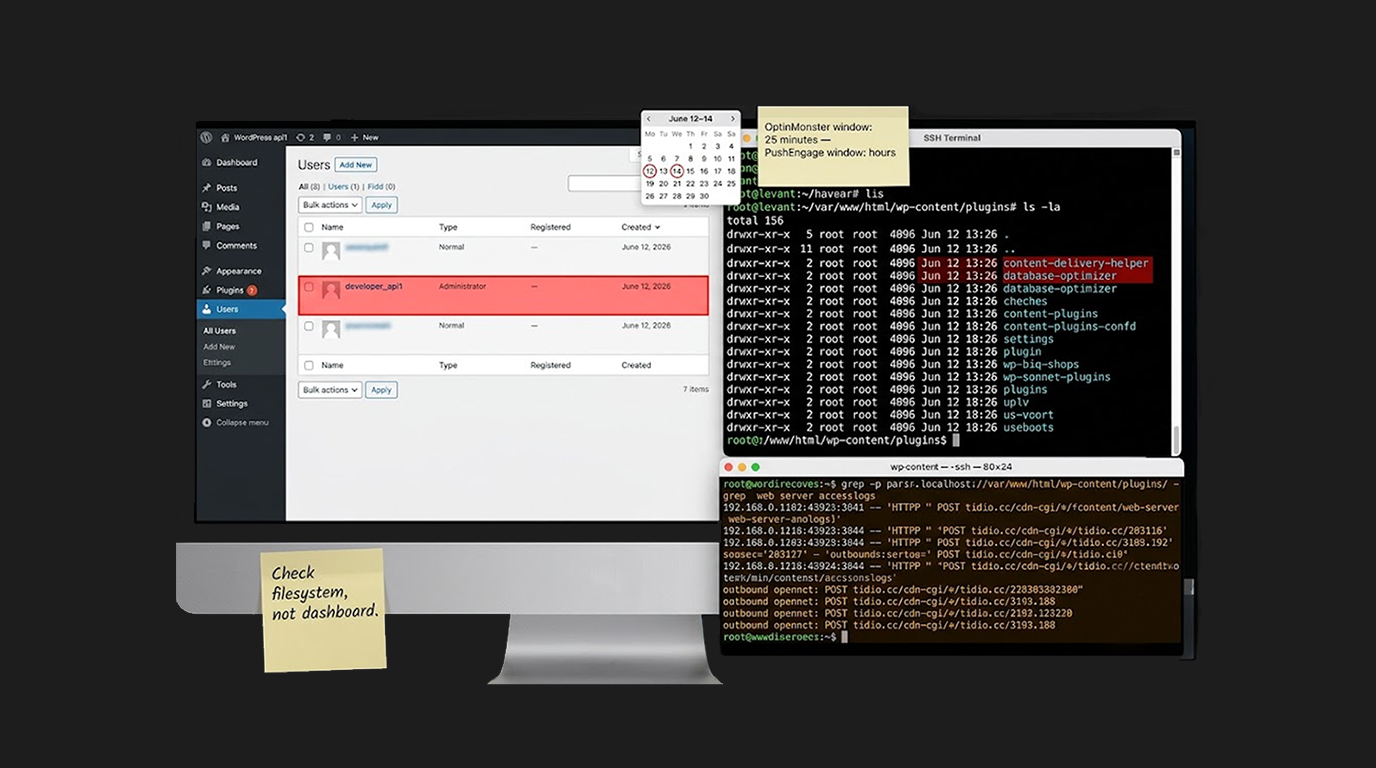
Step 2: Create a hidden admin account. The hacker created a new WordPress administrator account. PushEngage confirmed this occurred with developer_api1, dev_xxxxxx... etc.
Step 3: Install hidden plugin. The script installed a plugin that did not appear in the WordPress dashboard. This plugin is a Web Shell / or a way for the hacker to execute commands on the server remotely. The hacker only needs to know the URL of the Web Shell to execute arbitrary code on the server.
Step 4: Exfiltrate credentials. The new Admin account login info (usernames and passwords) and site information were exfiltrated to the domain tidio[.]cc (this is a fake domain) registered on 28 April, several weeks prior to the attack, indicating that this was a planned attack instead of being opportunistically hacked into.
Why This Is Hard to Detect
It was intended for the WordPress plugin supply chain attack to remain concealed.
1. When a user visits a page, regardless of their level of access, the malicious code only runs if they are logged-in as an administrator. Regular users will never activate the code.
2. No indication of the presence of the backdoor plugin will be visible within the admin dashboard of WordPress. Additionally, it cannot be located via the administrator interface.
3. Although the administrator account associated with the hacker can be deleted, the web shell will remain.
That last point is critical. The web shell is the real prize. It gives the attacker the ability to:
1. Read or change any file on the server
2. Copy the entire database
3. Plant additional backdoors
4. Inject card-skimming code on checkout pages
5. Redirect visitors to malicious sites
6. Steal customer data
Removing the named plugin and the extra admin account is not enough. Once an attacker has had code execution on your server, you must assume they left other persistence mechanisms.
How Did the Attacker Get In?
This is where the story gets murky. Two accounts, two explanations.
PushEngage's version: The attacker first broke into the server running its marketing website through a known vulnerability in UpdraftPlus, a WordPress backup plugin. That server is separate from the systems running the product.
But it held a CDN API key. With that key, the attacker changed the files the CDN was delivering to customer sites.
Sansec's position: The breached system is still unknown. Sansec says Awesome Motive's own servers are the most likely place. The CDN account is possible. The CDN provider (BunnyNet) is unlikely.
UpdraftPlus does have a separate authentication bypass vulnerability, CVE-2026-10795. Wordfence rates it 8.1 (high severity). It is now patched. Anyone running UpdraftPlus should update regardless.
But whether that bug had anything to do with this break-in is unconfirmed. Treat the entry point as unsettled.
What PushEngage Has Done
PushEngage verified the occurrence of an incident and implemented numerous actions:
1. Malicious files were removed from CDN and replaced,
2. CDN cache was cleared,
3. Compromised CDN API Key was changed,
4. all related credentials were rotated,
5. New Infrastructure for marketing site created.
None of this cleans a site that was already taken over. That part is up to the site owner.
What OptinMonster and TrustPulse Users Should Know
Awesome Motive has not issued official guidance for OptinMonster or TrustPulse as of June 15. Sansec observed the malicious code on both plugins, but only for a 25-minute window on June 12.
The lack of official communication does not mean you are safe. If your site runs either plugin, follow the same cleanup steps below.
How to Check If You Were Hit
Because the WordPress plugin supply chain attack hides from the WordPress dashboard, you cannot rule out compromise by looking at the admin interface. The only reliable check is on the server itself.
Step 1: Check your filesystem.
Look through wp-content/plugins to check for any suspicious folders:
1. Content Delivery Helper
2. Database Optimizer
3. Two commonly used backdoor plug ins. Don't rely on the Dashboard; rely on what is on the Disk.
Step 2: Identify Unauthorized Admin Accounts
You must either log into your WordPress database or use WP CLI in order to see all users with admin privileges. Be aware of the following types of accounts that may be unauthorized to be created (created by someone other than yourself), when checking through users:
1. Developer_api1
2. Dev_xxxxxx (any username matching this pattern)
3. Any user account that has an account creation date that cannot be verified as yours.
Step 3: Look At Your Web Server Access Log Files
Any outbound traffic from your web server to one of the following websites between June 12 and June 14 (UTC) is of concern
Tidio.cc (This website may have been accessed using a path beginning with “/cdn-cgi/”).
84.201.6.54 (The attacker's actual server).
Step 4: Perform a Scan For Unauthorized Files
You should also search for .php files created within your wp-content/ directory over the previous period. The shell used in the web attack could have many different names.
How to Clean Up If You Were Hit
If you find any indicator of compromise, assume the worst. The attacker had code execution on your server.
Immediate actions:
1. Delete the malicious plugin folders (content-delivery-helper, database-optimizer) from wp-content/plugins/
2. Delete any unauthorized admin accounts
3. Change all admin passwords (even legitimate accounts, you do not know if they were harvested)
Rotate everything:
1. Database credentials
2. API keys (especially any keys stored in wp-config.php)
3. WordPress salts and keys in wp-config.php (this forces all sessions to log out)
4. Any third-party API keys stored on the server
Consider reinstalling from backup:
If you have a clean backup from before June 12, restore it. Then update everything. The WordPress plugin supply chain attack left a web shell. Web shells can be hidden in legitimate files, in unexpected directories, or even in database entries.
Monitor going forward:
1. Watch for outbound connections to unknown IPs
2. Set up file integrity monitoring for wp-content/plugins/ and wp-content/themes/
3. Remove any plugins you do not actively need
The Bottom Line
The WordPress plugin supply chain attack is a wake-up call. Trusted plugins. Legitimate CDNs. Official JavaScript files. None of it mattered. The attacker got a CDN API key and changed what millions of sites loaded.
PushEngage users have official guidance. OptinMonster and TrustPulse users are still waiting. Do not wait for a company to tell you to check your site.
Scan your server. Check for the backdoor folders. Look for developer_api1. And remember: a web shell does not announce itself.
FAQ Section
What is the WordPress plugin supply chain attack?
It is a campaign where attackers tampered with JavaScript files served by PushEngage, OptinMonster, and TrustPulse. When a logged-in admin loaded the page, the script created a hidden admin account and installed a web shell.
Which plugins were affected?
PushEngage, OptinMonster, and TrustPulse. All three are owned by Awesome Motive.
How do I tell if my created site has been compromised?
Look for folders named either content-delivery-helper or database-optimizer inside of the wp-content/plugins/ directory on your site’s server file system. Look for any unauthorized admin account like developer_api1.
What happens next if there’s evidence of compromise?
Remove any of the malicious plugin folders, remove any existing unauthorized admin accounts, change your passwords, rotate your database credentials and API keys, and potentially restore from a clean pre-June 12 backup.
Was there any feedback that Awesome Motive had provided regarding OptinMonster and TrustPulse?
As of June 15, PushEngage was the only company to have provided an official guidance of the incident. Neither OptinMonster or TrustPulse have yet provided customers with any feedback.
Will I be able to detect this from the WordPress dashboard?
No. The backdoor plugin is not visible inside the dashboard. The code from the malicious backdoor is executed only while an admin is logged into the site. You will need to directly access the server for verification.