A software supply chain attack has compromised multiple PHP packages belonging to Laravel Lang, and the attackers have embedded a comprehensive credential-stealing framework that runs automatically on every PHP request.
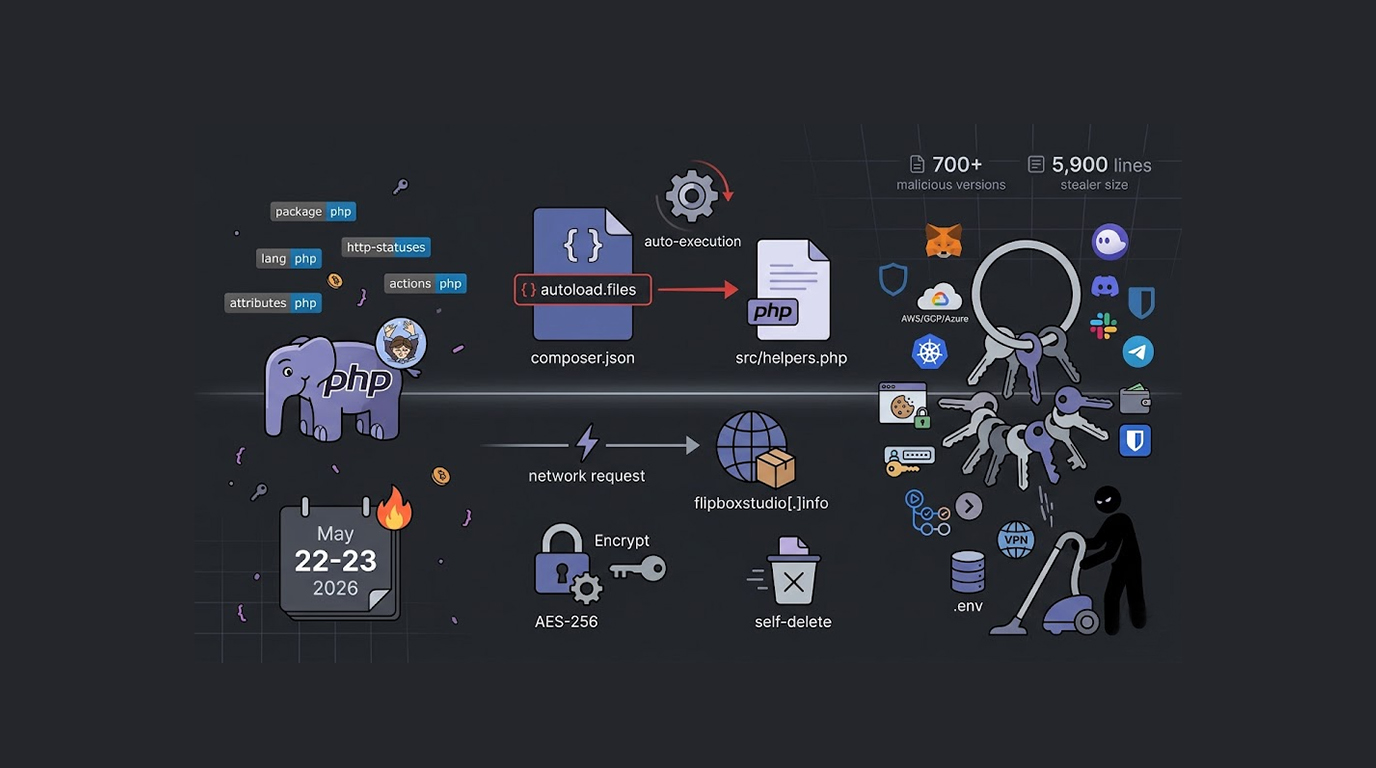
The Laravel Lang PHP supply chain attack affects four packages including laravel-lang/lang, laravel-lang/http-statuses, laravel-lang/attributes, and laravel-lang/actions.
Security researchers at Socket and Aikido Security flagged the Laravel Lang PHP supply chain attack, and more than 700 malicious versions associated with these packages have been identified.
The Rapid Tag Publishing
The Laravel Lang PHP supply chain attack involved automated mass tagging or republishing of package versions.
Based upon the timing and pattern of the newly posted tags, it implies that the Laravel Lang organization as a whole has had significant compromise in their release process, rather than only experiencing one rogue version of a malicious package. The tags appear to have been posted on May 22 and 23 2026 at an accelerated rate.
Many versions appeared only seconds apart, and this speed indicates automated tooling rather than manual publishing, and the attacker likely obtained access to organization-level credentials, repository automation, or release infrastructure.
The Backdoor Location
The core malicious functionality in the Laravel Lang PHP supply chain attack is located in a file named src/helpers.php that is embedded into the version tags.
Because this file is registered in composer.json under autoload.files, the backdoor is executed automatically on every PHP request handled by the compromised application, and the victim does not need to call any specific function.
The Laravel Lang PHP supply chain attack backdoor generates a unique per-host marker which is an MD5 hash combining the directory path, system architecture, and inode, and this marker ensures the payload only triggers once per machine to prevent redundant executions and help the malware remain undetected after the initial run.
The Payload Delivery
The Laravel Lang PHP supply chain attack contacts an external server at flipboxstudio[.]info to retrieve a PHP-based cross-platform payload that runs on Windows, Linux, and macOS.
According to Aikido Security, the dropper delivers a Visual Basic Script launcher on Windows and runs it via cscript, and on Linux and macOS it executes the stealer payload via exec().
The fetched payload is a large PHP credential stealer with approximately 5,900 lines of code, and it is organized into fifteen specialist collector modules, and after collecting everything it can find it encrypts the results with AES-256 and sends them to flipboxstudio[.]info/exfil, and then it deletes itself from the disk to limit forensic evidence.
Cloud Credentials
The Laravel Lang PHP supply chain attack steals a wide range of cloud credentials and tokens.
IAM roles and instance identity documents are stolen by querying cloud metadata endpoints from providers like AWS and Google Cloud, and Google Cloud application default credentials are harvested.
Microsoft Azure access tokens and service principal profiles are stolen, and Kubernetes Service Account tokens and Helm registry configurations are also targeted.
The Laravel Lang PHP supply chain attack also steals authentication tokens for DigitalOcean, Heroku, Vercel, Netlify, Railway, and Fly.io, and HashiCorp Vault tokens are harvested.
CI/CD Credentials
The Laravel Lang PHP supply chain attack targets continuous integration and deployment systems.
All Jenkins, GitLab Runners, GitHub Actions, CircleCI, TravisCI and ArgoCD tokens and configuration files have been compromised. These tokens often have broad access to both development and production environments.
If an attacker gains access to CI/CD credentials, they will be able to manipulate build pipelines, inject malicious code into applications designed for production release and potentially compromise production systems.
Cryptocurrency Wallet Thievery
In the case of the Laravel Lang PHP supply chain attack, there is a significant degree of attack force placed on the theft of cryptocurrency wallets. The attack consists of automatically collecting seed phrases, private keys, or key files related to multiple desktop wallets (e.g., Electrum, Exodus, Atomic, Ledger Live, Trezor, Wasabi, and Sparrow) as well as harvesting seed phrases associated with browser extension wallets (i.e., MetaMask, Phantom, Trust Wallet, Ronin, Keplr, Solflare, and Rabby).
Once an attacker has access to a seed phrase, they assume complete control over the associated cryptocurrency assets and are capable of removing all assets in a wallet without requiring any further authentication from the victim.
Browser Data Theft
The Laravel Lang PHP Supply Chain Attack also includes browser data regarding multiple browsers.
Google Chrome, Microsoft Edge, Mozilla Firefox, Brave, and Opera are all targeted, and the stealer captures browsing history, cookies, and login data.
The Laravel Lang PHP supply chain attack uses a Base64-encoded embedded Windows executable that bypasses Chromium's app-bound encryption (ABE) protections, and this means even encrypted browser data can be stolen.
Password Manager Theft
The Laravel Lang PHP supply chain attack targets local vaults and browser extension data for popular password managers.
1Password, Bitwarden, LastPass, KeePass, Dashlane, and NordPass are all affected, and stolen password vaults give attackers access to every password the victim has stored.
With password manager data, an attacker can compromise email accounts, banking sites, social media, and corporate systems, and the Laravel Lang PHP supply chain attack gives attackers a complete picture of the victim's digital life.
System Credentials and Configuration Files
The Laravel Lang PHP supply chain attack steals a massive range of system credentials and configuration files.
PuTTY and WinSCP saved sessions are harvested, and Windows Credential Manager dumps are stolen, and RDP files are also targeted.
Session tokens from applications like Discord, Slack, and Telegram are stolen, and data from Microsoft Outlook, Thunderbird, and popular FTP clients including FileZilla, WinSCP, and CoreFTP is harvested.
The Laravel Lang PHP supply chain attack steals configuration and credential files including Docker auth tokens, SSH private keys, Git credentials, shell history files, database history files, Kubernetes cluster configurations, .env files, wp-config.php, and docker-compose.yml.
Source Control and Environmental Variables
Environmental variables loaded into PHP Processes can be vulnerable due to attacks on the Laravel Lang PHP Supply Chain Attack. Some environmental variables can include API Keys, DB Passwords, or any Sensitive Information.
Access to Source Control can also be obtained via Global and Local .gitconfig, .git-credentials, and .netrc files, which allow attackers to access Private Repositories of Code.
An attacker with access to a Source Control System can read Proprietary Code, place Back Doors into a System, or steal Intellectual Property.
VPN Credentials
In addition to environmental variables and source control credentials, the Laravel Lang PHP supply chain attack can also compromise the VPN configuration and saved login files.
Attackers may focus on OpenVPN, WireGuard, NetworkManager, and commercial VPN services (e.g., NordVPN, ExpressVPN, CyberGhost, and Mullvad), where compromising the user’s credentials provides access to the confidential connections of internal corporate networks.
Exfiltration Process
The stolen data as part of the Laravel Lang PHP supply chain attack are encrypted with AES-256 encryption before leaving the system and being sent to the attacker’s server.
The data is sent to flipboxstudio[.]info/exfil, and after exfiltration the stealer deletes itself from the disk to limit forensic evidence, and this self-deletion makes post-incident investigation difficult.
The Laravel Lang PHP supply chain attack operators can collect stolen credentials at scale, and the server receives encrypted data from every infected system.
Expansion of the Attack
The Laravel Lang PHP Supply chain attack appear to have delivered over 700 distinct versions distributed between May 22 and 23, 2026. This indicates a good probability of an automated method used for creating the attacks or a large amount of back-end access was granted to the Laravel Lang infrastructure.
Any application that updated these packages during the attack window may have been compromised, and the Laravel Lang PHP supply chain attack backdoor runs automatically on every PHP request.
How to Protect Your Applications
The Laravel Lang PHP supply chain attack is serious, here is what you need to do:
1. Check your composer.json. Look for any of the affected Laravel Lang packages including laravel-lang/lang, laravel-lang/http-statuses, laravel-lang/attributes, and laravel-lang/actions, if you have any of these check the installed version.
2. Update to safe versions. The malicious versions were published on May 22 and May 23 2026, and newer safe versions should be available, update to the latest versions immediately.
3. Validate src/helpers.php file. If you find yourself using an infected one, you must compare it to a clean version available at https://github.com/flipboxstudio/flipbox-studio/tree/master/src/helpers , and then make the corresponding edits. After that, you will need to check external connections to flipboxstudio.info for infection.
4. Compromised files on your system have put your credentials at risk. All credentials held in cloud-based applications must be changed: it is also essential to rotate all API keys, SSH keys, relational database passwords, and tokens.
5. Clear browser cookies and saved passwords if you suspect that your development computer has been compromised. If you suspect your browser may be compromised, you should reset the session tokens on any service you connect to online.
6. Review cryptocurrency wallets. If you had cryptocurrency wallets on the compromised system, move funds to new wallets with fresh seed phrases, the Laravel Lang PHP supply chain attack steals seed phrases and wallet data.
Final Thoughts
The Laravel Lang PHP supply chain attack is one of the most comprehensive credential stealers ever seen in a PHP supply chain compromise.
The attack steals cloud credentials, cryptocurrency wallets, browser data, password managers, SSH keys, source control tokens, and VPN credentials, and it encrypts everything with AES-256 before exfiltrating to a remote server.
The Laravel Lang PHP supply chain attack backdoor runs automatically on every PHP request, and the malicious code is executed the moment a compromised package is loaded.
If you use any of the affected Laravel Lang packages, treat your system as compromised, rotate every credential you have, reset every token, and move any cryptocurrency to new wallets, because the Laravel Lang PHP supply chain attack leaves no credential untouched.
FAQ Section
Which Packages Are Involved In This Attack?
Also, the official packages (laravel-lang/lang) define different language strings; laravel-lang/http-statuses represent HTTP status codes; both of these packages contain malicious versions with the same version number (the version numbers range from 0.5.0 to 1.5.0) and all of them were added at two separate dates May 22 and May 23, 2026, resulting in over 700 versions with API differences.
How Does It Automatically Execute?
The malicious code executed back to the source directory of your project through the src/helpers.php file being registered under "autoload.files" in your composer.json auto-load classes.
What Data Was Taken?
The data that was taken from the Laravel Lang PHP Supply Chain attack were Cloud Credentials, Continuous Integration Continuous Deployment Tokens, Cryptocurrency Wallet Seed Phrases, Browser Data Cookies, Password Manager Vaults, SSH Keys, Source Control Tokens, Environment Variables and VPN Credentials.
Will this malware produce any evidence you can use to investigate after the incident?
The stealer deletes itself from the disk after stealing the data by exfiltrating it with AES-256 encryption, so it will eliminate any evidence you can use for an investigation after the incident occurred.
How can I take measures to stop this attack from damaging my app?
Check composer.json for harmful packages and upgrade them to safe versions; check src/helpers.php for any code you suspect to be bad; rotate all app credentials; clear all web browser history; move all cryptocurrency to new wallets.