Event ID 4672
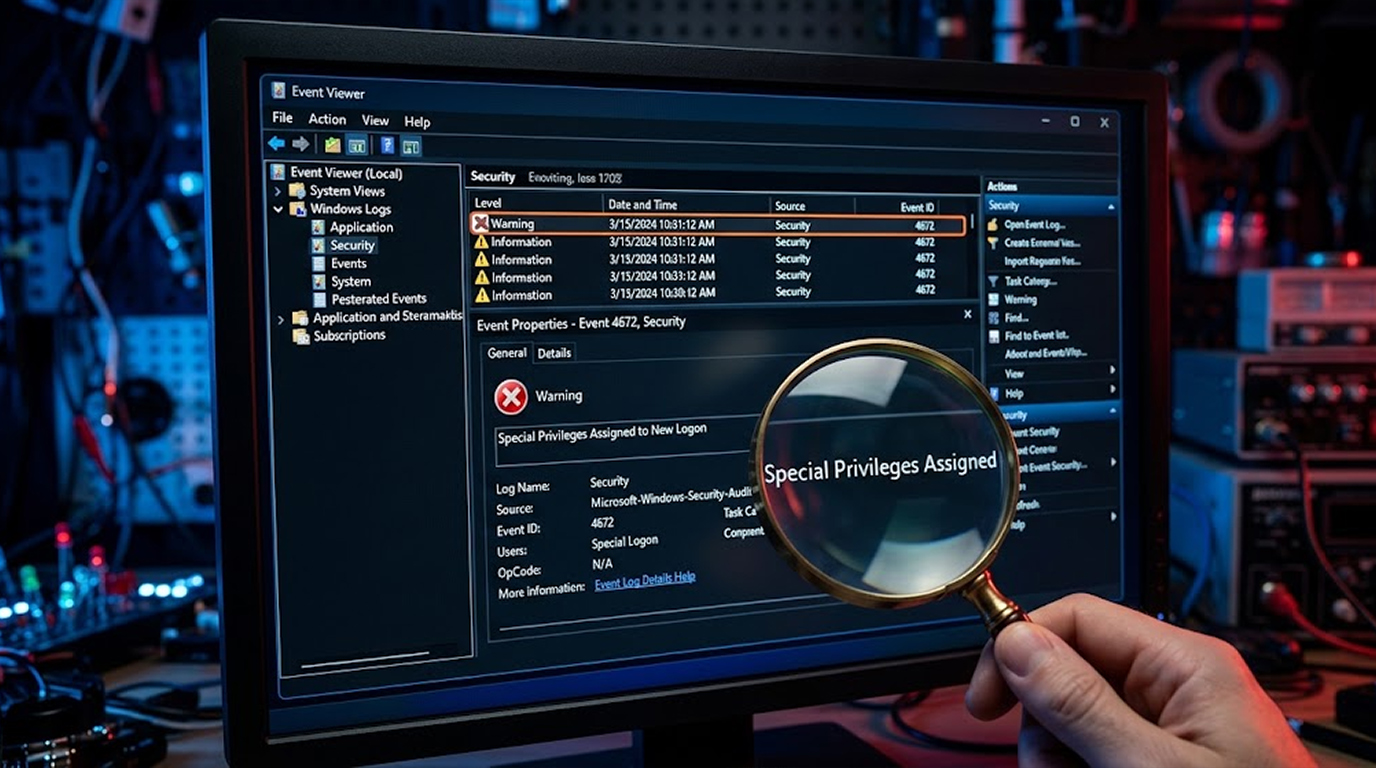
You are sitting there going through your Windows event logs. Everything looks fine. Then you spot it. Event ID 4672. Special privileges assigned to a new logon.
Somebody just logged in with admin rights. But here is the question. Was it your IT guy doing his job? Was it a hacker who stole an admin password? Or was it someone inside the company abusing their power?
Event ID 4672 is one of those events that should always make you stop and pay attention. It tells you exactly when someone gets admin access. And attackers know this. It is one of the first things they try to turn off.
Let us walk through how to catch privilege escalation and admin abuse using this event.
Important Disclaimer
This article is intended for educational and defensive purposes only. The techniques described here are shared to help security professionals understand emerging threats so they can better protect their systems.
Do not use these techniques against systems you do not own or do not have explicit written permission to test. Unauthorized testing is illegal in most jurisdictions.
What Is This Event Anyway?
Event ID 4672 pops up whenever someone logs in with admin privileges. Every single time a user account with special rights logs into a Windows machine, this event gets logged.
Here is the thing though. It only shows up on the machine where the login happened. If someone logs into a domain controller, it logs there. If they log into a regular workstation, it logs there. You will not find it on some central server unless that is where the login occurred.
The event tells you a few important things:
- Who logged in
- What domain or machine they came from
- A unique session ID for that login
- A list of the actual privileges they got
That last part is the goldmine. The privileges list tells you exactly what powers that account now has.
Why You Should Care About This Event
It Screams "Admin Access"
When Event ID 4672 shows up, you know someone is doing admin stuff. That is fine if it is your sysadmin doing their job. But it is exactly what attackers want too.
It Catches Privilege Escalation
If a regular user account suddenly triggers Event ID 4672, something is wrong. Either someone stole that account, or they found a way to give themselves admin rights they should not have.
Threat Hunters Love It
This event is consistently rated as one of the most valuable for threat hunting. It is a dead giveaway of high-privilege activity. And because attackers know this, they try to kill it.
Attackers Try to Hide It
Once attackers get admin access, they often try to disable logging for Event ID 4672. They know it will give them away. So if you notice that this event is not showing up when it should, that is actually a red flag. It might mean someone already compromised your system and is covering their tracks.
Understanding the Privileges
The privileges list in Event ID 4672 tells you exactly what the account can do. Here are the ones you really want to watch for.
|
Privilege |
What It Means |
|
SeAssignPrimaryTokenPrivilege |
Can replace a process token |
|
SeAuditPrivilege |
Can generate security audits |
|
SeBackupPrivilege |
Can bypass file and directory permissions |
|
SeCreateTokenPrivilege |
Can create a primary token |
|
SeDebugPrivilege |
Can debug and adjust memory of processes |
|
SeIncreaseQuotaPrivilege |
Can adjust memory quotas |
|
SeLoadDriverPrivilege |
Can load and unload device drivers |
|
SeRestorePrivilege |
Can restore files and directories |
|
SeSecurityPrivilege |
Can manage audit and security logs |
|
SeShutdownPrivilege |
Can shut down the system |
|
SeSystemEnvironmentPrivilege |
Can modify system environment variables |
|
SeSystemProfilePrivilege |
Can gather system performance information |
|
SeSystemtimePrivilege |
Can change the system time |
|
SeTakeOwnershipPrivilege |
Can take ownership of files and objects |
Real Stories from the Field
Story 1: The Phished Admin
What Happened
A company had a standard admin account that the IT team used every day. Nothing unusual. Then one day, an attacker phished the password and logged in remotely.
How They Caught It
Event ID 4672 logged the login. The security team noticed it happened at 2 AM. The IP address was not from their VPN range. That was enough to investigate.
What They Did
They reset the password immediately. The attacker never got a chance to do anything. Just a quick login that got caught before any damage was done.
Story 2: The Employee with a Grudge
What Happened
An employee was leaving the company. They had admin rights on their own machine. They started disabling security software and deleting logs. Their intention had been to cause chaos once they were gone.
How They Caught It
Event ID 4672 showed that the user logged in administratively at odd hours. They were also using privileges they normally did not need for their job.
What They Did
The security team revoked their access early. No damage done.
Story 3: The Privilege Escalation
What Happened
A standard user account in the corporate network did not have any administrative rights. Then one day, that same account triggered Event ID 4672. Someone had found a vulnerability and escalated their privileges.
How They Caught It
The account had never triggered Event ID 4672 before. The timing and context looked off. That was enough to start an investigation.
What They Did
They patched the vulnerability and tracked down what the attacker did while they had access.
How to Actually Find This Event
Looking Manually in Event Viewer
You can find Event ID 4672 pretty easily. Just open Event Viewer, go to Windows Logs, then Security. Filter by Event ID 4672 and you will see everything.
Here is what you want to look for:
- Logins at weird times
- Accounts that should not have admin rights
- IP addresses you do not recognize
- Multiple logins from different places
- Logins that happen around the same time as other suspicious events
Automating Your Detection
Most organizations automate this. There are two common ways.
PowerShell Scripts
You can write scripts that pull Event ID 4672 entries from the last 24 hours or week. The script can search by account name, detect logins out of business hours, or identify suspicious permissions. Many teams schedule these to run daily and email alerts.
SIEM Rules
If you have a SIEM, you can create rules that trigger on Event ID 4672. For example, you can alert when a non-admin account triggers it, or when a login comes from a weird location.
What to Investigate
If an Event ID 4672 seems suspicious, consider asking the following:
- At what time did this occur? Was it during business hours? On a weekend? At 3 AM?
- Who was it? Is this account supposed to have admin rights? Have they triggered this event before?
- Where did it come from? Is the IP address familiar? Is it from your VPN? Is it from another country?
- What privileges? Are they normal for this user? Do they include things like SeDebugPrivilege or SeTakeOwnershipPrivilege?
- What did they do after? Did they run suspicious processes? Access sensitive files? Make weird network connections?
Using Sysmon with This Event
What Sysmon Gives You
Sysmon adds extra logging that makes Event ID 4672 much more useful. It logs process creation, network connections, and process access.
- Process creation tells you what programs they ran. If you see PowerShell or command prompt or hacking tools, that is a warning sign.
- Network connections tell you where the machine connected to. Suspicious IP addresses and domains could mean data theft and communication with hackers.
- Process access tells you what processes they touched. If they accessed LSASS or other sensitive processes, they might be stealing credentials.
How to Connect the Dots
The key is the logon ID. Event ID 4672 has one. Sysmon events have the same one. You search Sysmon events with that logon ID and you see everything that happened during that admin session.
That is how you really hunt threats. One event tells you someone logged in as admin. The other events tell you what they actually did.
Setting Up Alerts That Actually Work
Decide What Looks Suspicious
Start by defining what suspicious means for your organization.
- Business hours matter. Most admin work happens during business hours. A login at 3 AM on a Sunday is worth a look.
- Weird accounts matter. If a user who is not in the admin group triggers Event ID 4672, that is privilege escalation. Investigation is to be done at once.
- Such privileges are important. SeDebugPrivilege, SeTakeOwnershipPrivilege, and SeSecurityPrivilege are not needed for routine administration actions. They are suspicious.
- Weird locations matter. If your company only operates in one country and a login comes from another country, that is suspicious.
Set Up Your Alerts
With a SIEM, you can create rules that alert on any of these conditions. A login outside business hours from a known admin might be medium severity. A login from a non-admin account is high severity.
With PowerShell, you can schedule a daily report of all Event ID 4672 entries. Review it manually and dig into anything that looks off.
What to Do When an Alert Fires
First, confirm. Is this a scheduled maintenance window? Is it a known admin doing routine work? If yes, document it and move on.
If it is suspicious, contain it. Revoke the account. Reset the password. Block the IP at the firewall.
Then investigate. Did they access other systems? Steal data? Install malware? Use Sysmon and other logs to reconstruct what happened.
Finally, fix it. Patch the vulnerability that allowed the escalation. Improve your monitoring. Update your alert rules.
Common Mistakes to Avoid
Alert Overload
If you alert on every admin login, you will get buried in false positives. You will stop paying attention.
The fix is to refine your alerts over time. If a user logs in every day at 9 AM, that is normal. Stop alerting on it. Focus on the outliers.
Missing Real Attacks
If you set your alerts too narrow, you will miss real attacks. Attackers know about Event ID 4672. They will try to avoid triggering it.
The fix is to also look for missing events. If a known admin is logging in but Event ID 4672 is not showing up, that could mean logging is disabled. Investigate.
Ignoring the Context
Event ID 4672 alone is not enough. It tells you someone logged in as admin. It does not tell you if that was malicious.
Always look at the full picture. Who logged in? When? From where? What did they do? That is what determines whether something is suspicious.
The Bottom Line
Event ID 4672 is one of the most valuable events in the Windows security log. It tells you exactly when someone gets admin privileges. It catches privilege escalation. It catches compromised accounts. It catches insider threats.
Attackers know this. They will try to stop it from logging. Your job is to monitor it, investigate it, and act on it.
Set up alerts. Correlate with Sysmon. Investigate anomalies. Do not ignore the weird stuff.
Attackers want admin access. Event ID 4672 tells you when they get it. Make sure you are watching.
FAQ Section
What is Event ID 4672?
Event ID 4672 is generated when a user logs on with administrative privileges. It indicates that special privileges were assigned to a new logon session.
Why is Event ID 4672 important?
It is one of the clearest indicators of administrative access. It detects privilege escalation, administration compromise, and insider threats.
Where will you find the Event ID 4672 log?
It is logged on the system where the logon occurred. It is not logged on a domain controller unless the logon is to the domain controller itself.
What privileges should I watch for?
SeDebugPrivilege, SeTakeOwnershipPrivilege, SeSecurityPrivilege, SeBackupPrivilege, and SeRestorePrivilege are among the most suspicious.
How do I manage to detect suspicious logins under event ID 4672?
It is important to know that there can be login attempts made during times other than business hours, login attempts made from IP addresses which are not related to business, and login attempts made by non-administrator accounts.
What should I do if I find any suspicious logins in Event ID 4672?
I must investigate immediately, analyze the account, the IP address of the logon attempt, and what happened during it.
Can attackers suppress Event ID 4672?
Yes. Attackers who gain administrative access often try to disable logging for Event ID 4672. If the event is missing when it should be present, that is a red flag.
How can Event ID 4672 be connected to other events?
The correlation between Event IDs such as process creation, network connections, and process access can be achieved through Logon ID to Event ID 4672.