Some phishing campaigns never send a message.
Instead of pushing links into inboxes, attackers wait for users to search.
The trust comes from Google, not the sender.
This approach is slower, quieter, and often more effective against cautious users.
What SEO Poisoning Really Is
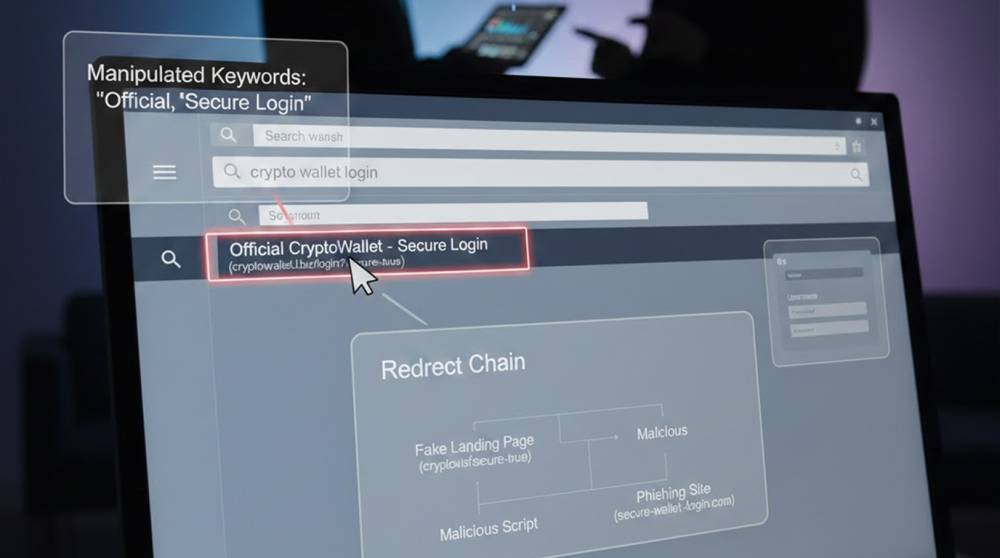
SEO poisoning places attacker controlled pages where users already look.
The content is indexed, ranked, and presented as legitimate.
When users click, they believe they found the site themselves.
This shifts responsibility away from security controls and toward user trust.
Where SEO Poisoning Appears Most Often
SEO poisoning attacks are most common in the following areas based on documented incidents:
1. Login portals, such as SSO, Cloud Dashboards, and VPNs
2. Software downloads
3. Documentation/support pages
4. Instructions for invoices and payments
5. Brand-specific error messages
These poisoned search results typically provide what appears to be helpful information but don't create a sense of urgency.
Technique 1: Cloned Pages Hosted on Disposable Domains
Attackers clone real sites and adjust just enough to rank.
Indicators of attack are:
1. A Domain Name that was registered recently.
2. A URL that carries a Brand Name.
3. The content of the Page mimics that of official documentation.
4. The Login Form posts credentials to an unintended recipient.
Here are Examples of the types of domains you may see:
1. login-company-support[.]com
2. company-auth-help[.]net
Detection Example
whois suspicious-domain.com | grep "Creation Date"
New domains hosting “official” content deserve scrutiny.
Technique 2: wo: Hacking into Legitimate Compromised Sites
compromised legitimate sites are much more effective than using new domains.
Attackers exploit:
1. WordPress Blogs
2. Unused Forums
3. Subdomains of Universities
They will then inject SEO optimized pages that rank high in search engines.
Reasons why;
1. There is an established domain reputation already.
2. Search engines trust these types of websites as they have a long established history of being used for their original purpose.
3. Security software doesn't normally block these types of sites.
The phishing page lays dormant within a subdirectory.
Technique 3: Targeting People Looking For Solutions to Errors
Most people searching for help with errors will most likely be upset and stressed.
Attackers purposely seek out these types of queries such as:
1. "Office 365 Locked Account"
2. "VPN Connection Failed, How to Fix"
3. "How to log into an Invoice Payment Portal?"
The page tries to help them fix their problem by requesting their login credentials.
The real pattern of this type of campaign:
1. Pages will be updated daily based on the latest trending errors.
2. Content will look neutral, giving instructions etc. without being an obvious urgency.
3. Victims rarely report these types of incidents due to the stress caused by the loss of their accounts.
Technique 4: Search ads as a way to bypass rankings
Search ads are used by some of these campaigns as a way to get through the ranking process altogether. In this way, they buy ad placements.
Ad Behavior Observed
1. Links to ads that look like they come from an official site.
2. Ads run only when the business is open.
3. A campaign will generally run for a few hours and not several days.
4. Once the campaign is reported, the account is already closed.
SEO Poisoning Tools
Attackers utilize tools they are familiar with in order to run these campaigns. Common tools found in these campaigns include:
1. Plugins that allow users to inject pages into CMS systems
2. SEO Optimization Frameworks
3. Google Search Console misuse
4. Static website generators
5. Scripts that cloak web traffic
The infrastructure used for phishing looks very similar to that used for marketing.
Example: Identifying Phishing Attacks via Search Results
SOC teams usually utilize a search reconnaissance method while determining if a phishing website was created.
For example:
site:company.com login
Then compare that with:
site:company-support.com login
The goal is to find instances of brand impersonation (i.e., use of cloned wording) with the results.
SEO Based Phishing Identification
Indicators of a compromised account can be located in the logs of the phishing attack.
Indicators of common activity are:
1. Referrals made by search engines to access stolen credentials
2. Attempts made from residential IPs soon after accessing the stolen credentials
3. Unusual referer URLs found in authentication logs.
Example Log Check
grep "Referer" auth.log | grep -i "google"
Search origin logins deserve attention.
Why SEO Poisoning Works So Well
From real incidents, the reasons are consistent:
1. Users trust search results
2. No direct phishing message exists
3. Security awareness training focuses on email
4. URL inspection feels unnecessary
People believe they initiated the interaction.
To lessen the chances of defensive measures, it is important to implement a robust defense system that emphasizes visibility and education.
Some of the ways brands can effectively defend against identity fraud include:
1. Monitoring search engine listings for brand abuse
2. Alerting you when a new domain is created using your brand keywords
3. Including the Referer Analysis in authentication monitoring
4. Educating users on how to detect search-engine-based phishing scams
5. Registering common typo and support-type websites
Simply blocking email addresses from which you receive spam will not protect you from identity fraud.
Key Takeaways
1. SEO poisoning bypasses email defenses entirely
2. Search trust replaces sender trust
3. Compromised legitimate sites are common hosts
4. Detection often happens after credential misuse
5. Search behavior must be part of threat modeling
If users search under pressure, attackers will meet them there.