An issue with Remote Sunrise Helper, made by RS Ltd for Windows, allows unauthorized users access to view all files and folders on the device and has since been fixed. The flaw was discovered by security expert Chokri Hammedi, and allows the attacker to search through the file system without needing to log in or provide any kind of authentication.
The affected version of this software runs on Windows 10 and Windows 11 computers. The software has been made available as a free download from RS Ltd.'s website.
How the Vulnerability Works
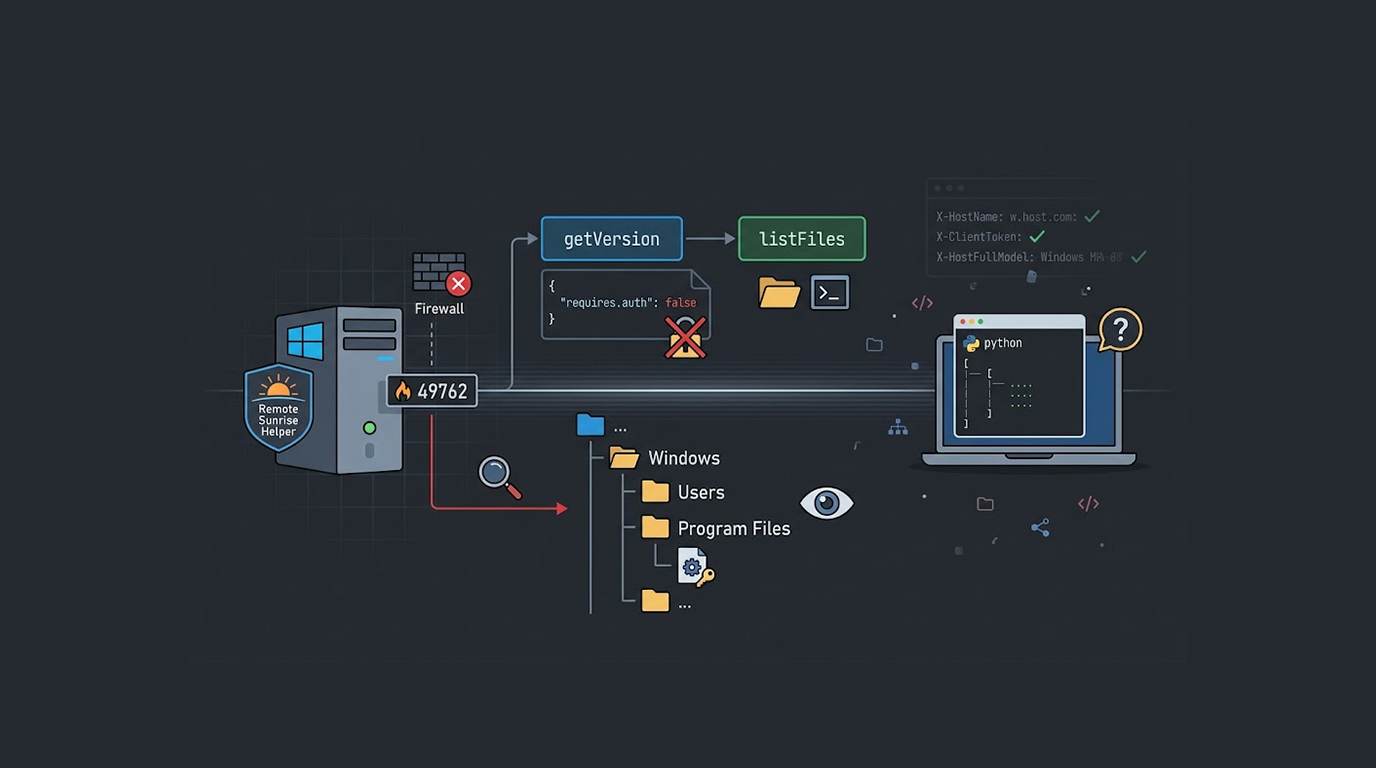
There is a Port (TCP 49762) associated with the Remote Sunrise Helper that exposes API Endpoints, i.e. the api/getVersion API endpoint allows the attacker to discover what version of the application they are running as well as whether it requires authentication to access the other API Endpoints.
If the requires.auth field returns FALSE, then an attacker can utilize the Remote Sunrise Helper unathorized directory listing flaw to access the other API endpoints without a username and password; such as utilizing the api/listFiles API endpoint.
The Exploit
The proof-of-concept exploit for the Remote Sunrise Helper unauthenticated file listing vulnerability is a simple Python script.
The exploit first connects to https://<target>:49762/api/getVersion and checks the JSON response for the requires.auth field, if this field is false the target is vulnerable.
The exploit then sends a request to https://<target>:49762/api/listFiles with custom headers including X-HostName, X-ClientToken, and X-HostFullModel, and these headers bypass any remaining access controls.
The Remote Sunrise Helper unauthenticated file listing exploit can also accept an optional path parameter, and the attacker can browse any directory on the system by appending the path to the listFiles endpoint.
Example Usage
The Remote Sunrise Helper unauthenticated file listing exploit is straightforward to use.
To check if a target is vulnerable: python exploit.py 192.168.1.103
This command will show the root directory listing if the target is vulnerable, and it will indicate if authentication is required.
To list a specific directory: python exploit.py 192.168.1.103 'C:/Users'
This command lists the contents of the Users folder on the target system.
To perform directory listing with system variables in Python: python exploit.py 192.168.1.103 '%USERPROFILE%/Desktop'
Remote Sunrise Helper allows unauthenticated file listings with URL encoded path variables (for example %USERPROFILE% variable) that will be resolved by target system.
API Exposure
Vulnerability exposes sensitive API endpoints on port 49762 (given below) as well.
The api/listFiles endpoint returns JSON formatted response containing all files with the file name, size, last modified date and last accessed dates if available. The information returned by these file lists can help an attacker to perform reconnaissance through the targeted filesystem.
This reconnaissance will help an attacker build a layout of the target’s filesystem. Therefore, they will be able to locate files that may contain sensitive data, such as configuration files, databases, or SSH keys.
The attacker does not need to download the files directly, but knowing where sensitive files are located is the first step toward exfiltrating them through other means.
The Authentication Bypass
The Remote Sunrise Helper unauthenticated file listing vulnerability is made possible by an authentication bypass.
The api/getVersion endpoint reports requires.auth as false, and this indicates that the software was configured to run without authentication, but even when authentication is supposed to be required the custom headers may bypass checks.
The exploit includes X-HostName, X-ClientToken, and X-HostFullModel headers with arbitrary values, and these headers trick the software into thinking the request comes from a trusted source.
The Remote Sunrise Helper unauthenticated file listing vulnerability shows that API security is not just about requiring authentication, it is also about validating that authentication properly.
Affected Systems
The Remote Sunrise Helper unauthenticated file listing vulnerability affects Remote Sunrise Helper version 2026.14 on Windows 10 and Windows 11.
Other software versions could be at risk, but the exploit was tested against 2026.14. The default TCP port used by the software is 49762, and systems with this port exposed are considered high-risk.
What an Attacker Can See
An attacker can get a detailed file system view of a target via an unauthenticated file listing vulnerability with the Remote Sunrise Helper.
Attacker's ability to list the root directory enables them to see all drives and folders available on a target and to recursively browse all directories and map out the entire file structure.
An attacker can search for configuration files that contain passwords; SSH keys used to access other systems; database files containing customer data; backup files that may have been overlooked; and log files that contain sensitive data.
The Remote Sunrise Helper unauthenticated file listing vulnerability does not allow file downloads directly, but knowing the exact path to a sensitive file is often enough to steal it through other vulnerabilities.
How to Protect Your Systems
The Remote Sunrise Helper unauthenticated file listing vulnerability can be mitigated.
1. Upgrade your software (check with RS ltd for a newer version of Remote Sunrise Helper as the unauthorized file listing vulnerability may be patched).
2. Create a firewall rule to restrict traffic into the port 49762 by allowing connections only from trusted IP Addresses that are permitted to connect to the port 49762; otherwise, they will be able to remotely list (with or without authentication) files via Remote Sunrise Helper through access to port 49762.
3. Support authentication if available (have your software require users to enter their username/password to gain access to the Remote Sunrise Helper; the exploit will fail if you have an unauthenticated request to use Remote Sunrise Helper).
4. Check logs for suspicious activity from unexpected IP addresses (check for requests to api/getVersion and api/listFiles; an unauthorized file listing attack will create these requests).
5. Isolate Remote Sunrise Helper if possible (if you don’t use Remote Sunrise Helper over your network, use it on a computer that has no network access or is behind a VPN).
Vendor Answers
Chokri Hammedi discovered and published exploit details for the Remote Sunrise Helper unauthenticated file listing vulnerability on April 20 2026. Users of Remote Sunrise Helper should assume that they are vulnerable and take measures now to mitigate any potential impact.
Risk of Port Exposure
Remote Sunrise Helper has highlighted how putting internal services onto the Internet exposes them to potential attacks. Although it is not as common as other ports, some attackers will scan for open ports over all of their IP address space regardless of the actual port number, meaning that any service available through a port can be located by the attacker.
If a system has Remote Sunrise Helper installed with an exposed port 49762, then no matter who the attacker is (whether internal or external to the organization), they will have an opportunity to exploit this vulnerability.
Regularly audit which ports are exposed. Use network segmentation to limit the number of non-critical services exposed to the external world.
Conclusion
The Remote Sunrise Helper unauthenticated file listing vulnerability represents one of the greatest data exposure problems, even though it does not provide remote code execution access to an attacker. An attacker with access to file listings will be able to map the entire file structure of your network drive, find sensitive files, and plan other attack methods on your systems, without having to authenticate.
Exploiting this vulnerability is extremely easy. The proof-of-concept Python script to exploit this vulnerability is extremely small (less than 50 lines), and the reliability of the script makes it easy to use.
If you utilize Remote Sunrise Helper, be sure to determine whether or not port 49762 is exposed, restrict access to trusted IP addresses, and monitor for abuse of the Remote Sunrise API (especially if you have redirected all access to port 49762 to a trusted server).
The unauthenticated file listing vulnerability of Remote Sunrise Helper demonstrates how simple information disclosure vulnerabilities can lead to the formation of more serious compromises.
FAQ Section
What is the unprotected file listing vulnerability with the Remote Sunrise Helper?
The unprotected file listing vulnerability exists in the Remote Sunrise Helper 2026.14 program on any system with it installed, allowing someone without an account to use the api/listFiles endpoint (TCP port 49762) to see all directories and files on that system.
What versions of Remote Sunrise Helper are vulnerable?
Testing for exploitation was conducted against version 2026.14 of Remote Sunrise Helper for Windows 10 & 11 but other versions may also be vulnerable.
Will an attacker be able to download any files because of this vulnerability?
The unprotected file listing vulnerability in the Remote Sunrise Helper will allow an attacker to see a list of all directories and files on a given system but will not allow files themselves to be downloaded. However, having knowledge about where a file resides may enable an attacker to target that file using alternative means.
How can I check whether my Remote Sunrise Helper is vulnerable?
You can verify your Remote Sunrise Helper installation is vulnerable by checking whether the api/getVersion endpoint returns requires.auth=false and by confirming that api/listFiles returns a directory listing without requiring any form of authentication.
Is there a patch available?
If you believe your computer is running an affected version of Remote Sunrise Helper, contact RS Ltd to obtain an upgraded version of the Remote Sunrise Helper application; however, in the meantime restrict access through firewalls to any systems running Remote Sunrise Helper via TCP port 49762.