A vulnerability was found in Notepad++ that permits attackers to execute any arbitrary code by modifying a configuration file. The vulnerability affects all versions of Notepad++ up to and including version 8.9.6.
This arbitrary code execution vulnerability is tracked as CVE-2026-48778, and Kavin Jindal from Avyukt Security first discovered the vulnerability.
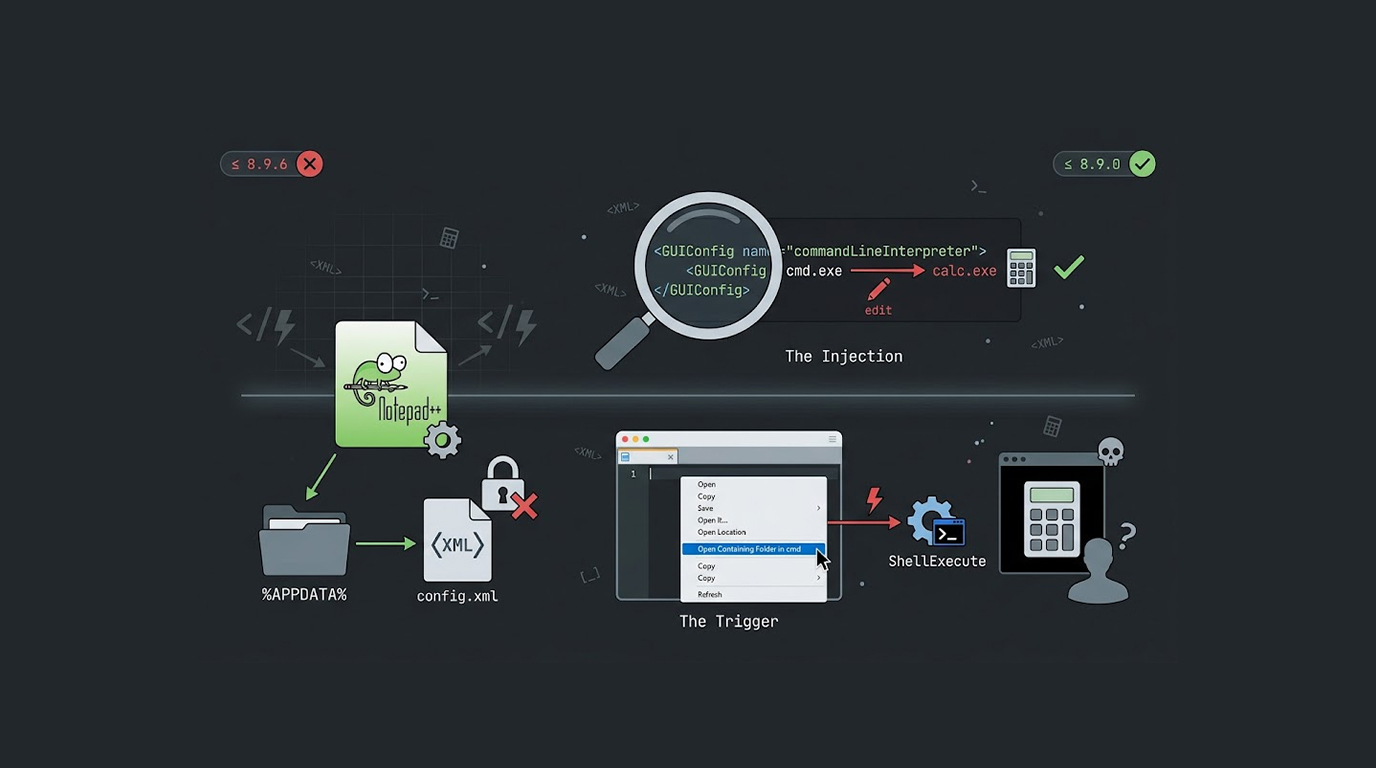
The reason this vulnerability occurs is that Notepad++ reads the commandLineInterpreter setting in config.xml without performing any proper validation, and then it directly passes that value to the Windows ShellExecute function.
General Explanation of the Vulnerability
The Vulnerability in Notepad++ Arbitrary Code Execution via Config.xml exists due to the way Notepad++ processes its "Open Containing Folder in cmd" functionality.
Right-clicking on a file tab and selecting "Open Containing Folder in cmd" invokes Notepad++ to open a command prompt window, while also reading the command prompt executable path from the Config.xml file.
The Config.xml file can be found here %APPDATA%\Notepad++\config.xml, and specifically, the vulnerable setting can be found under the GUIConfig name="commandLineInterpreter" element.
An attacker with access to write to this Config.xml file could modify the commandLineInterpreter element to point to any executable, which will then be executed on the user's machine when the "Open Containing Folder in cmd" functionality is invoked from Notepad++.
The Attack Requirements
Notepad++ arbitrary code execution through config.xml has a number of requirements to successfully exploit this vulnerability.
To successfully exploit this vulnerability, the attacker needs to have write access to the victim's %APPDATA%\Notepad++\config.xml file , which may be gained in a number of ways.
The attacker could physically access the system themselves, have previously compromised the system over the Internet or they may be able to manipulate and drop the malicious configuration file through another vulnerability or attack vector.
Once the victim accesses the "Open Containing Folder in cmd" functionality within Notepad++, the exploit will execute the malicious executable code of the attacker using the privileges of the victim.
The Proof of Concept
The proof-of-concept for the Notepad++ arbitrary code execution config.xml vulnerability is simple and effective.
The exploit script looks for the GUIConfig name="commandLineInterpreter" element in the current config.xml file, if it finds it then it replaces that element with calc.exe. If it can't find the element, it will append a line containing the malicious configuration before the closing tag.
Once the modified configuration is written back to disk, when the victim opens Notepad++ and clicks on the function to "Open Containing Folder in cmd", the Notepad++ arbitrary code execution config.xml vulnerability gets triggered.
The Impact
The Notepad++ arbitrary code execution config.xml vulnerability allows an attacker to execute arbitrary code under the current user context.
In the proof-of-concept, calc.exe is used to demonstrate the vulnerability, but a real attacker could substitute any executable.
Potential malicious payloads include reverse shells, keyloggers, ransomware, credential stealers, or any other malware, and the executable runs with the same privileges as the Notepad++ user.
If the victim has administrative privileges, the attacker's code also has administrative privileges.
Affected Versions
The Notepad++ arbitrary code execution config.xml vulnerability affects Notepad++ versions up to and including 8.9.6.
Versions of Notepad++ prior to 8.9.6 are subject to exploitation, therefore, users should upgrade when patches are released.
The aforementioned vulnerabilities have now been fixed; therefore, users are encouraged to update to a fixed version as soon as possible.
What Caused the Vulnerability
The arbitrary code execution vulnerability in Notepad++ as it relates to the config.xml file is due to the lack of validation when processing the configuration file.
Identification of configuration files as untrusted will allow for exploitation in the event that an attacker can change the configuration file.
Validating or sanitizing the commandLineInterpreter entry before passing it to ShellExecute will prevent exploitation of this vulnerability in the future.
As a part of the remedy, the commandLineInterpreter entry will be validated to ensure it's an executable path for a valid command prompt; if not, the value will be rejected/ignored.
The Role of %APPDATA%
The %APPDATA% directory is a user-writable location, and this is intentional for storing user-specific application settings.
The Notepad++ arbitrary code execution config.xml vulnerability is possible because config.xml is stored in a location that the user (and any malware running as the user) can modify.
This is not a flaw in Windows, it is a design choice, and Notepad++ should not trust that the configuration file has not been tampered with.
How to Protect Yourself
The Notepad++ arbitrary code execution config.xml vulnerability can be mitigated:
1. Ensure that your copy of Notepad++ is of version 8.9.6 or later so that you cannot be exploited via vulnerabilities linked to CVE-2026-48778. Versions of Notepad++ prior to version 8.9.6 should not be used.
2. After installing a patch, be careful when utilizing the function “Open Containing Folder in CMD”. This feature has resolved the potential for arbitrary code execution through the exploitation of the config.xml file; however, there are still vulnerabilities that have not yet had any patches applied on some untrusted systems where arbitrary code execution may also occur when the command is executed.
3. Routinely check for unauthorized modifications and for abnormal commandLineInterpreter values in the config.xml file.
4. When using Notepad++, try to operate using the most low-privileged method possible. Do not run Notepad++ as an administrator unless you absolutely need to; if you do run Notepad++ as an administrator, if there was to be a security issue with the config.xml file, an attacker could potentially leverage your administrative access and run something using Notepad++ on your machine.
5. Utilize endpoint security solutions, since it will detect unauthorized changes to your config.xml file; or detect unexpected executables being executed from your config.xml when Notepad++ is run.
Disclosure Timeline
Kavin Jindal discovered the Notepad++ arbitrary code execution vulnerability in config.xml and reported it. It was given CVE-2026-48778 and a security advisory was submitted to GitHub. Notepad++ issued patches for this vulnerability, so users are advised to upgrade to the latest version of Notepad++.
An adversarial perspective
The Notepad++ arbitrary code execution Vulnerability in config.xml allows an attacker to maintain a foothold or to perform an elevation of privilege attack against a target victim's machine.
If an attacker has write access to the %APPDATA% directory of a victim, they can modify the Notepad++ configuration, and they can wait for the victim to trigger the vulnerable feature.
The attacker does not need to convince the victim to run an executable directly, they only need to wait for the victim to use a legitimate Notepad++ feature.
The Notepad++ arbitrary code execution config.xml vulnerability turns a legitimate user action into a malicious code execution.
The way to fix this vulnerability
CommandLineInterpreter must be validated before executing commands through it, to resolve the vulnerability found in Notepad++'s config.xml, which allows for arbitrary code execution.
Notepad++ should verify each possible value against a pre-defined list of valid cmd.exe executable files and should deny executing anything that is not a known good executable.
In addition to verifying executable files prior to execution, the commandLineInterpreter should be either completely removed or moved out of a potentially unsafe location at the same time.
If you are a user of Notepad++, please upgrade to the most current version to implement this fix.
Final Thoughts
This incident illustrates that configuration files are generally considered trusted attack surfaces.
An attacker with write access to a configuration file can often achieve code execution, and Notepad++ is not the only application vulnerable to this pattern.
The Notepad++ arbitrary code execution config.xml vulnerability is fixed in newer versions, but many users may not update, and each outdated Notepad++ installation is a potential entry point for attackers.
If you use Notepad++, check your version today, update to the latest release, and be aware that even text editors can be weaponized when their configuration files are writable.
FAQ Section
What is CVE-2026-48778?
CVE-2026-48778 is a Notepad++ arbitrary code execution config.xml vulnerability that affects versions up to and including 8.9.6, the commandLineInterpreter setting is not validated and is passed to ShellExecute when "Open Containing Folder in cmd" is triggered.
How can an attacker exploit this vulnerability?
An attacker with write access to %APPDATA%\Notepad++\config.xml can change the GUIConfig name="commandLineInterpreter" value to any executable path, and when the victim uses "Open Containing Folder in cmd" the attacker's executable runs.
With what level of permission are the attacker's commands executed?
The arbitrary code execution vulnerability located in the Notepad++ config.xml file could be executed using the same permission level as that of the user logged into Notepad++ (so if the user has admin permission then the code will run with admin permission).
Is this security hole fixed in newer versions of Notepad++?
Yes, the Notepad++ config.xml arbitrary code execution vulnerability has been fixed in a newer version of Notepad++, therefore users should update to the latest version now.
Should I be doing anything if I have already upgraded Notepad++?
You will be protected from the Notepad++ config.xml arbitrary code execution vulnerability if you have upgraded to a patched version of Notepad++, however you should continue to check your config.xml file for any unauthorized modifications.