Updated on August 19, 2024
Two-Factor Authentication (2FA) provides an extra layer of security to your accounts by requiring not only your password but also a second form of verification. Here’s how you can enable it:
Go to Your Account Settings:
- Navigate to the settings or security section of the account you want to secure (e.g., Gmail, Facebook, Instagram, etc.).
- Find 2FA or Security Options:
- Look for options like “Two-Factor Authentication,” “2-Step Verification,” or “Login Approvals” in the security settings.
- Choose a 2FA Method:
- Most platforms offer a few 2FA options:
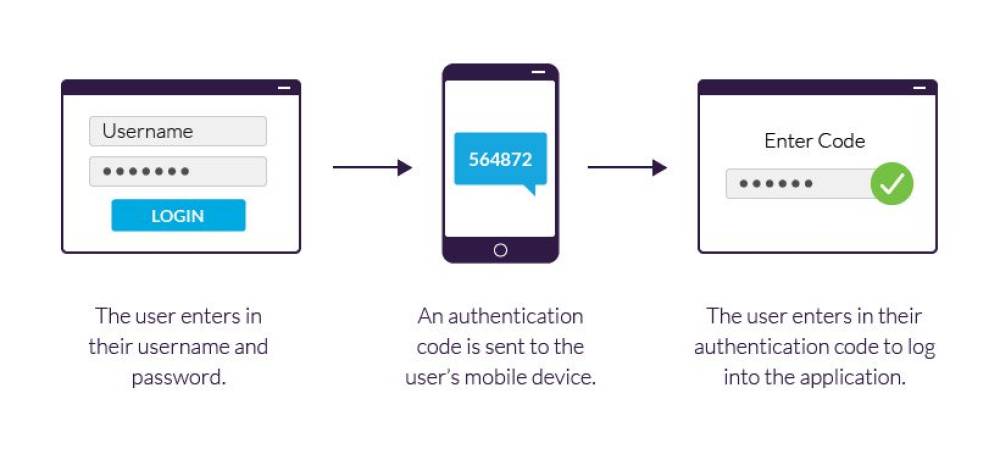
- SMS Text Message: You’ll receive a one-time code via SMS.
- Authenticator App: Use apps like Google Authenticator, Authy, or Microsoft Authenticator for time-based codes.
- Email Verification: Some platforms send a code to your email.
- Hardware Security Key: A physical device used for authentication (such as YubiKey).
- Set Up Your Preferred Method:
- Follow the instructions to set up your preferred method (e.g., scan a QR code with your authenticator app or enter your phone number for SMS codes).
- Backup Options:
- Many services offer backup codes or alternative verification methods in case you lose access to your primary device. Store these codes in a safe place!
- Test It Out:
- Once set up, log out of your account and log back in to test the 2FA. After entering your password, you’ll be prompted for the second factor (such as the code from your app or SMS).
Tip: Use an authenticator app instead of SMS when possible for better security. SMS can be vulnerable to SIM swapping attacks.