DarkSword is an advanced iOS spying framework that has been in use to conduct highly targeted attacks since late in 2025. DarkSword is so dangerous because it can use zero-click or one-click vulnerabilities in iMessage, Safari, and some system services, usually without any obvious signs that there's been a successful exploit against the user.
To help you assess whether your iPhone is currently susceptible to DarkSword or any similar sophisticated piece of spyware for iOS, here’s a straightforward, practical step-by-step guide:
Step 1: Confirm Your iOS Version
DarkSword targets vulnerable versions of iOS. The following versions, as of early April 2026, are known to be at the highest risk of exploitation:
1. iOS 18.0 through iOS 18.2.1 are the most victimized versions.
2. iOS 17.0 through iOS 17.6.1 have been exploited previously through older exploits.
3. iOS 16.x are old legacy versions, but do have some use still.
The most secure versions currently in use (as of April 2026) include:
1. iOS 18.3 or later get the major patches to block the current, most well-known exploits for DarkSword.
2. iOS 17.7 and above have backdoored patches for many of the vulnerabilities that could also lead to exploits via DarkSword.
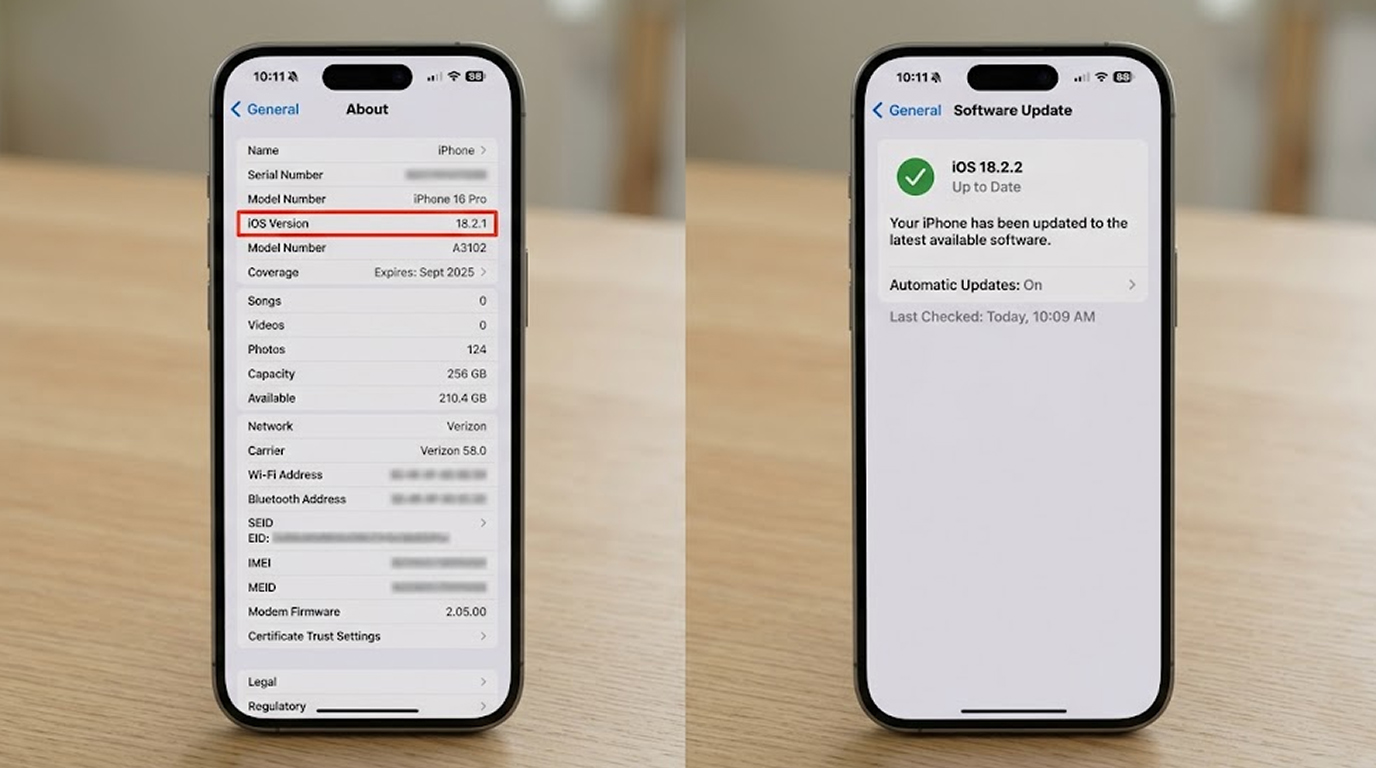
How do you check your iOS version:
1. Open the Settings application.
2. Select General → About
3. Identify what version of iOS is listed on the OS Version line.
If you find that you are using iOS 18.2.1 or older, then you are at a significantly greater risk of being exploited than someone who is using a version above iOS 18.3 or your version is iOS 17.7 or newer.
Step 2: See if any of these are present on your device by looking for signs of infection from DarkSword
DarkSword has been built to deploy stealthily, but there are still unique signs of infection:
1. Consistent low-battery life or excessive draining, even while not being used
2. High amounts of data transferred where you cannot explain the reason
3. Unaccountable and delayed messages or unread notifications in iMessage
4. Safari either crashes or navigates and responds to requests differently on certain web pages
5. Configuration profiles are present or listed as unknown within your Settings → General → VPN and Device Management menu.
If you discover any of these items, it is likely that your device has been infected by DarkSword; you should assume that the device has been compromised.
Step 3: Quick Self-Check Actions
1. Immediate Software Update of iOS
a) Go to Settings, then General, and finally Software Update
b) Install any available update as Apple has released many patches quickly for vulnerabilities in DarkSword-like apps.
2. Turn On Lockdown Mode (If high risk i.e. journalist, activist, executive)
a) Go to Settings, Privacy and Security, Lockdown Mode, and simply turn it ON
b) Lockdown Mode will greatly reduce your risk of being attacked, but it will also disable several very useful features.
3. Check For Installed Profiles
a) Go to Settings, General, and then VPN and Device Management to view the profiles installed on your iOS device.
b) Delete any Profile that you do not recognize.
4. Check for Suspicious Applications
a) Look through the App Library and Home Screen for any applications you cannot remember installing.
b) Pay Attention to applications that may have "System Update", "Security Tool", and generic Icons.
Step 4: Recommended Ongoing Protection
1. Keep your iOS device updated with the latest version of iOS when new updates are released.
2. Use a strong passcode - alphanumeric not only being 6 numeric digits.
3. Avoid opening links sent through an unknown source via iMessage
4. Be careful when using Safari.
5. If you are in a high-risk category, enable Lockdown Mode permanently.
Summary of Key Points
If you are still on iOS 18.2.1 or an earlier version, your iPhone could be vulnerable to DarkSword attacks, so updating your iPhone or iPod Touch to the latest version of iOS is the most effective thing you can do immediately.
For most users who don't have high levels of risk, it's enough to simply stay up-to-date with iOS and use basic caution when clicking on links and attachments. However, for high-risk individuals, using the most current version of iOS together with Lockdown Mode is currently the best way to protect yourself.
Today, check your current version of iOS and upgrade if needed; taking 5 minutes will help prevent any future attacks by increasing the security of your device.